


Coconote - AI Note Taker
4.654.00 Reviews
App Specs
- Version
- 1.21
- Updated On
- License
- Free
- Downloads
- 500,000+
- Developer
- Quizlet Inc.
- Categories
- Education
- Platform
- Android
Screenshots
 Analysis by AppCompare
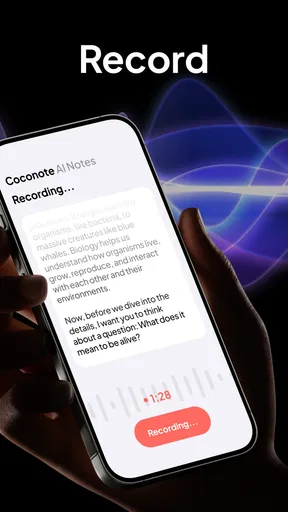
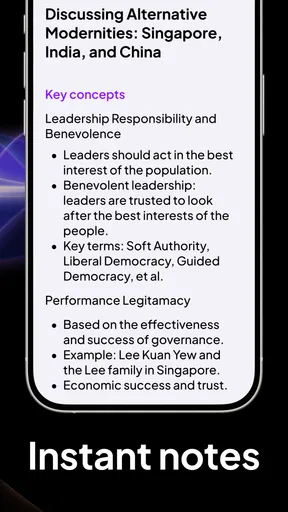
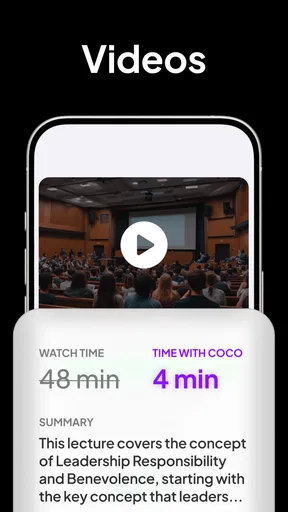
I found Coconote - AI Note Taker most interesting as a study companion rather than a replacement for a notebook. It is an education app from Quizlet Inc. that turns a recorded lecture into study material, including notes, flashcards, quizzes, podcasts and related formats. That basic idea sounds simple, but the useful part is the change in workflow: instead of leaving class with one long recording and a pile of unfinished notes, I can start with material that is already organized for review.
My first impression is that it is aimed at reducing the delay between hearing something and studying it. That matters after a long lecture, when manually rewriting everything feels like another assignment. The app is free to install, suitable for Everyone, and has earned a 4.7 average from around 5.3 thousand ratings. It has also passed half a million installs, which gives it the feel of an established learning tool rather than an experiment that only works for a narrow group.
What to expect from the learning workflow
The most important expectation to set is that Coconote is an input-to-review tool. You provide a lecture recording, and the app creates several ways to revisit the material. I would not approach it expecting a perfect transcript, a finished essay, or a substitute for understanding the lesson. Its value is in giving me a structured first draft of my study resources so I can spend more time checking ideas and less time formatting them.
That distinction is especially important for subjects where wording matters. A generated note can help me locate the main concepts, but I still need to compare it with the lecturer’s explanation, slides, formulas, examples and any instructions from the course. In my experience, the best use is to treat the generated material as a helpful study map. It points me toward what to review; it should not become my only source.
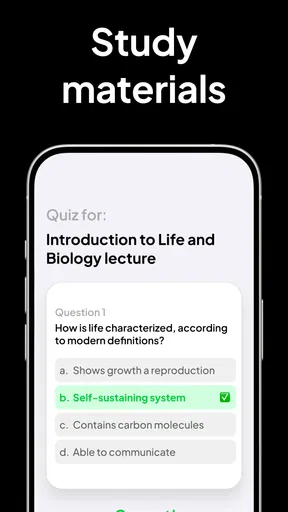
The range of output formats is more useful than it may seem. Notes suit a quick overview, flashcards are better for active recall, quizzes help expose weak spots, and a podcast-style version can make repetition easier during a walk or commute. The practical strength is not one magical summary; it is having several study routes from the same lecture. I can choose the format that matches the moment instead of forcing every review session into rereading paragraphs.
There is also a useful trade-off here. Converting a lecture into many formats can make studying feel easier, but convenience can encourage passive consumption. Listening to a generated podcast is not the same as retrieving an answer from memory. I would use the audio-style material for a first pass, then move to flashcards or quizzes when I need to find out whether I actually remember the content.
Who will get the most from it
Students who regularly attend lectures, online classes or revision sessions are the clearest audience. It can also help someone who takes rough notes while listening and wants a second, more organized layer afterward. If I am concentrating on the speaker, I do not have to choose between writing every sentence and missing the next explanation. The recording becomes a reference point, while the generated study material gives me a faster way to revisit the session.
Worth Reading Before You Choose

EA SPORTS FC Mobile 26 Is a Bigger Football Game, but It Takes Time

Flipboard Shows What News Apps Must Do Beyond the Feed

Switching to Android Auto Means Rethinking Your Driving Routine

Google Calendar Makes a Crowded Week Easier to Manage

Ludo King Makes the Most of the Minutes Between Plans

Baby Panda World Brings Quick Play to Modern Phones, but Its Game Library Feels Busy
It may also suit learners who struggle with one fixed study method. Someone who dislikes dense notes might prefer questions. Someone who remembers better through repetition might use flashcards. Another person may understand a topic more easily by hearing a compact explanation. That flexibility is a genuine advantage over a traditional notebook, where the format is decided at the moment I write it and can be difficult to change later.
I would be more cautious if I needed highly polished professional minutes, exact legal wording, or a carefully edited academic record. Coconote is built around learning from recorded material, not around replacing human editing in situations where every sentence must be verified. It is also less appealing for a person who already has a disciplined handwritten or typed-note system and does not want to review machine-generated material.
How it differs from ordinary note-taking apps
A standard notes app gives me a blank page and complete control. That is excellent when I know exactly how I want to organize information, but it also means that the work of sorting, summarizing and creating review questions remains mine. Coconote takes a more guided route: the recording is the starting point, and the app turns that source into study-oriented material.
Compared with a basic voice recorder, the difference is even clearer. A recorder preserves what was said, but it leaves me with the job of finding the important moments later. Here, the intended workflow moves beyond storage toward review. Compared with manual flashcard apps, it can reduce the time needed to create the first set, although manually written cards may still be better when I need precise wording or very selective prompts.
I would not call it automatically better than those alternatives. A blank notes app wins when I need diagrams, personal shorthand, project planning or information unrelated to a lecture. Manual cards win when I already know the exact questions I want to practice. Coconote is strongest in the middle: when I have substantial spoken content and want help turning it into several usable study formats.
Getting started without making the first session harder
I would make the first session a small experiment, not a full course setup: choose one lecture you already know a little about, then decide whether you want a clear overview or a way to test recall. That gives you a useful comparison point when you check the generated material against your class notes. With that simple baseline in place, it is easier to spot the moments that may feel less obvious to a new user.
Install, identify the source, and keep the first test small
The app is free, although in-app purchases range from $2.49 to $189.99 per item. I would begin by checking the available options inside the app before building my entire study routine around it. That is not a criticism of the concept; it is simply sensible when a free entry point sits alongside optional purchases. Starting with one short, low-stakes lecture lets me judge the workflow before deciding whether it fits my needs.
The current version is 1.21, and the minimum operating system is 10. On a compatible Android or iOS device, my first setup would be deliberately simple: choose a lecture I understand reasonably well, make sure the recording is usable, and decide what I want from the result. If my goal is exam preparation, I would look for questions and flashcards. If my goal is catching up after class, I would begin with notes and a broad summary.
That choice of goal is a small step, but it prevents a common mistake. New users can be tempted to generate every available format immediately. I think that creates unnecessary noise. For a first attempt, I would select one main output, inspect it carefully, and only then add another format. This makes it easier to notice whether the source was clear and whether the generated material reflects the lesson accurately.
Prepare the recording like study material
The quality of the result depends heavily on the quality and structure of the source. A lecture with clear speech and a logical progression is easier to turn into useful notes than a recording full of interruptions, overlapping voices or long stretches of unrelated conversation. I would avoid testing the app with the most chaotic recording in my library. A clean sample gives a fairer picture of what the workflow can do.
I would also keep course materials nearby during the first review. If the lecture includes technical terms, names, equations or specialized vocabulary, I would compare the generated notes with the original slides or my own observations. This is one of the less obvious but most important habits: the app can save me from reconstructing the whole lecture, but it cannot remove the need to verify details that affect grades.
For privacy and courtesy, I would make sure I am allowed to record the session before using any recording-based workflow. The right approach depends on the classroom, instructor and local rules. I would not quietly record a discussion simply because the technology makes it possible. A clear, permitted recording is also more useful than one made under awkward conditions, where I am distracted or the microphone is poorly positioned.
Turn the first result into an actual study session
My recommended first success is not merely generating notes. It is taking those notes and testing myself with a small set of questions. After reading the overview, I would close it and try to explain the central idea in my own words. Then I would use the quiz or flashcard format to identify what I cannot recall. That two-stage process changes the app from a content generator into a study loop.
One practical workflow is to review the notes shortly after class, use flashcards the following day, and return to the quiz format before an assessment. I would mark confusing concepts in my own notebook rather than assuming the generated material is complete. This creates a useful division of labor: Coconote handles the first organization pass, while I handle judgment, correction and prioritization.
A second useful tactic is to compare formats instead of consuming them all passively. If a note says a concept is important but the related questions are vague, that tells me the lesson may need closer review. If the flashcards focus on minor details while missing the lecturer’s main argument, I would not blindly memorize them. The mismatch itself is information about where the generated study aid needs editing.
A realistic evening after class
Imagine I have attended a long biology lecture and arrived home with incomplete handwritten notes. I would use the recording to create an initial set of notes, read through it once, and check unfamiliar terms against the lecture slides. Rather than listening to the full recording again, I would use the generated material to locate the main sections. Then I would try a quiz and write down the two or three concepts I missed.
Later, I might use flashcards for those weak areas instead of repeatedly rereading the whole lecture. If I have a commute the next morning, the podcast-style output could provide a convenient refresher, but I would treat it as preparation rather than proof that I know the topic. By the end of that process, I have a clearer list of questions to ask in class or investigate in the textbook. That is a meaningful result from one recording.
Where first-time users may get confused
The main learning curve is understanding that several study formats serve different purposes, rather than treating them as interchangeable versions of the same result. I would start by checking whether the notes capture the lecture’s structure, then use questions or cards to see what I can retrieve without looking. A little deliberate checking helps avoid the confusion that can arise when polished output seems complete before you have verified it.
Generated material is a starting point, not a transcript you should trust blindly
The biggest source of confusion is likely to be the difference between polished-looking output and verified understanding. Notes can appear organized even when a technical detail needs correction. I would pay special attention to definitions, sequences, numbers, names and distinctions between similar concepts. These are exactly the areas where a small mistake can produce a misleading flashcard or quiz answer.
My solution is to use the original lecture as the authority and the generated resources as navigation. I would check the first result before sharing it with classmates or relying on it for an exam. This does add a review step, but it is still less work than creating every note, question and card from the beginning. The time saving comes from reducing repetition, not from eliminating responsibility.
More formats do not always mean better studying
Another common misunderstanding is assuming that every available format belongs in every study plan. I would choose according to the task. Notes are useful when I am trying to understand the structure of a lesson. Flashcards work when I need retrieval practice. Quizzes are useful when I want an honest check of weak areas. Audio-style review is convenient when my eyes and hands are busy, but it is the least reliable option for measuring recall.
For that reason, I would resist creating a large library of duplicated material. A focused set of cards based on missed questions is often more useful than a huge collection generated from every sentence. This is one of the best ways to keep the app from becoming another source of clutter: use it to narrow attention, not to collect endless versions of the same lecture.
Know when another tool is the better choice
If I need to plan a group project, annotate a PDF, draw a diagram or maintain a personal knowledge base, I would choose a conventional notes app. If I need exact, hand-crafted flashcards with carefully controlled wording, I would probably create them manually. If I learn mainly through textbooks and rarely attend recorded lectures, the central workflow here may not justify changing my habits.
I would also skip it for situations where recording is inappropriate or impossible. The app’s usefulness depends on having suitable spoken material to work from. It cannot turn a missing lecture into a complete lesson. In those cases, a textbook, teacher-provided notes or a conventional study planner would be more dependable.
Make the next session more efficient
Once the first workflow works, I would keep a simple routine: identify the lecture objective, generate one primary study format, verify the important details, and use a second format only for practice. I would also separate “understand” sessions from “memorize” sessions. Notes and audio can help me build context; flashcards and quizzes should challenge me after the context is clear.
That routine makes the app feel less like an automatic answer machine and more like a flexible assistant. It also helps me judge whether the optional purchases are worthwhile for my own use instead of deciding based on novelty. Someone who processes lectures every week may value the convenience more than someone who only needs occasional revision support.
My recommendation after using it as a study companion
I like Coconote because it addresses a real frustration: lectures contain more information than most people can capture neatly in real time. Its combination of notes, flashcards, quizzes and podcast-style review gives me several ways to return to the same material, and the free starting point makes it easy to test the idea with a single class.
My recommendation comes with a clear condition: I would use it to accelerate the first draft of studying, not to outsource learning. The strongest results come from checking the generated notes, turning weak points into active questions, and keeping the original lecture or course material close by. That approach preserves the convenience while avoiding false confidence.
Quizlet Inc. has positioned this app in the education category, and the design makes the most sense for students who learn from spoken lessons. The Everyone age rating also makes it approachable for a broad audience, but suitability is not the same as usefulness for every learner. A person who prefers complete manual control, works mostly with visual documents, or needs formal records may be happier elsewhere.
For a first-time user, I would start with one permitted, clear lecture and aim for one concrete outcome: read the generated notes, complete a short quiz, and write down what still needs checking. If that saves time without weakening my understanding, I would continue using it as part of my routine. My honest verdict is that Coconote is most valuable when it turns a forgotten recording into an active review session. Used that way, it is a practical education app rather than just another place to store class material.
Pros
- Quickly turns recordings and conversations into organized notes.
- AI summaries make long lectures or meetings easier to review.
- Supports multiple note formats for different types of content.
- Searchable notes help locate important details without replaying audio.
- Useful for students
- professionals
- and personal voice journaling.
Cons
- AI summaries may miss context or misunderstand unclear speech.
- Some advanced features may require a paid subscription.
- Recording quality depends heavily on the device microphone.
- Uploading recordings can raise privacy concerns for sensitive discussions.
- Large audio files may consume storage or take time to process.
FAQs for Coconote - AI Note Taker
What is Coconote - AI Note Taker, and what can it do?
Coconote is an AI-powered note-taking app designed to turn spoken conversations, lectures, meetings, interviews, and other recordings into organized written notes. After importing audio or recording directly in the app, it can generate a transcript, summarize the main ideas, and help structure important details. It is especially useful for students, professionals, and anyone who wants to review information without manually writing everything down.
Does Coconote support audio recording and transcription in real time?
Coconote can be used to capture spoken content and convert it into text, but the exact recording and processing experience may depend on the version of the app, device permissions, internet connection, and supported language. Before recording, you should allow microphone access and check that the app is working correctly. For important meetings or classes, it is sensible to make a short test recording first and keep the original audio when possible.
Is Coconote - AI Note Taker free to download and use?
The app may be available to download at no initial cost, but some advanced features can require a subscription, usage credits, or an in-app purchase. Limits may apply to recording duration, transcription volume, AI summaries, exports, or storage. We recommend reviewing the pricing page and subscription terms inside the App Store or Google Play listing before starting a trial, since trial periods can automatically renew if they are not canceled.
How accurate are Coconote’s transcripts and AI-generated summaries?
Coconote can save considerable time, but its transcription and summaries should not be treated as perfectly reliable. Accuracy may change with background noise, multiple speakers, accents, technical vocabulary, poor microphone quality, or overlapping conversations. AI summaries can also omit context or misunderstand an important statement. For academic, legal, medical, or business-critical information, review the transcript and compare the summary with the original recording before relying on it.
Is my recorded audio and note data private and secure in Coconote?
Because Coconote processes recordings and notes with cloud-based AI services, you should read its current privacy policy and terms before uploading sensitive material. Check how audio, transcripts, and account data are stored, processed, retained, and potentially shared with service providers. Always obtain permission before recording other people, particularly in workplaces, classrooms, or private conversations, and avoid uploading confidential information unless you are comfortable with the app’s privacy practices.


